State of artificial intelligence in New Hampshire
Forum at Saint Anselm's Center for Ethics in Society explores the impact of AI and its potential to boost profit margins
 Artificial intelligence is showing up everywhere today. New tools launch every day and many of them promise big boosts in speed and productivity. It’s not surprising when employees reach for AI to write drafts, summarize documents, or brainstorm ideas. AI can feel like a friendly knowledgeable digital assistant that never gets tired. It works fast, stays available, and helps you get way more done! However, with great power comes a challenge of great responsibility! This article details practical tips to help you avoid the most common AI usage mistakes cybersecurity professionals see today.
That challenge is not technology. That challenge is learning how to use AI safely and responsibly. Many employees feel unsure about what they can or cannot do or share with AI tools. Others worry about leaking sensitive information by mistake. These worries are normal. They also show that most people want to use AI responsibly. The good news is that with the right habits, anyone can enjoy the benefits of AI without putting sensitive data at risk.
AI models are very impressive if not almost magical in their abilities, yet they work in a simple way. They predict the next word or image based on patterns they have learned. They do not understand the world. They do not know your company. They simply guess what comes next. These guesses can look correct, but guesses are still guesses. This is why users must remain responsible for and review all the content AI creates!
There are also several real risks worth noting. Data leakage is a common problem. Many public AI tools store or learn from what you type. Confidential information should never go into public AI systems or AI tools your company has not approved for use. AI can also expose private client details or sensitive internal documents if someone copies and pastes without thinking. Prompt injection is another threat. Attackers can hide harmful instructions inside prompts. AI might then perform actions you did not expect or request.
AI hallucinations are well known. The system may invent facts with total confidence, even citing sources that do not exist. Compliance issues are also possible. AI output may include protected content or reflect bias in training data. Fake AI tools can also hide malware. Finally, phishing scams now pretend to be AI tool updates or AI service requests. These scams look real and can often fool AI Tool users.
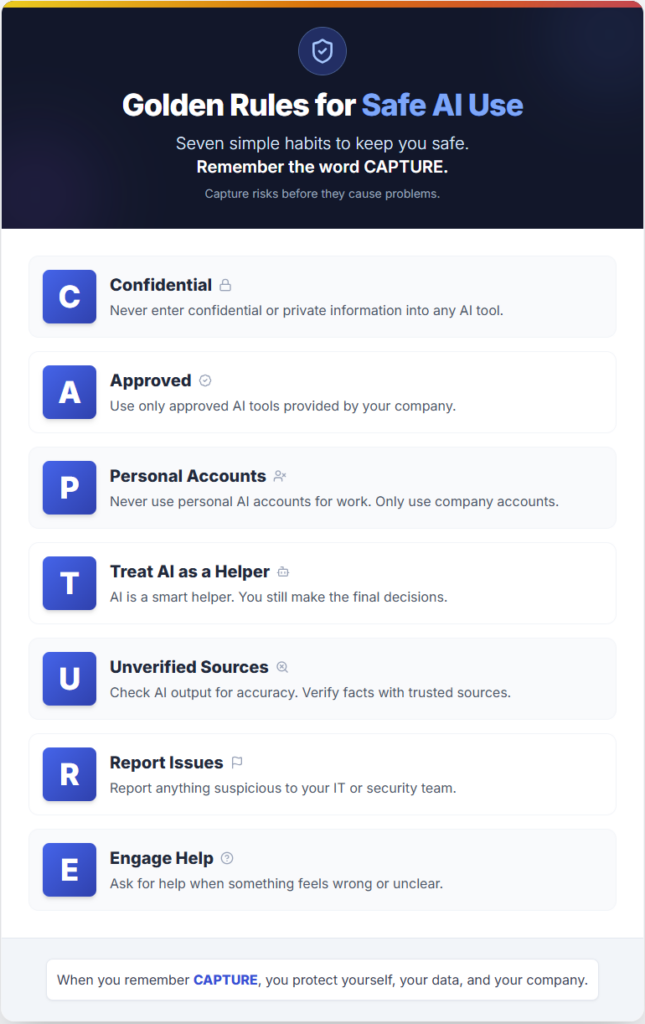
None of these risks are the employee’s fault. AI moves fast and most people are still learning. What matters is having a clear set of safe usage rules. To help with this, CyberHoot created a simple memory tool, or mnemonic, called CAPTURE. The CAPTURE model gives employees seven AI Safety habits that keep them safe while they explore AI.
You can also view the CAPTURE graphic included with this article. It provides a quick reference guide and makes the rules easy to remember.
Here is a short overview of each rule.
C is for Confidential. Never enter confidential or private information into a public LLM or unapproved AI tool.
A is for Approved. Only use AI tools that your company has reviewed and approved.
P is for Personal Accounts. Never use personal AI accounts for work. Only use company approved tools and accounts.
T is for Treat AI as a Helper. AI is a smart helper but you must still make the final approval decisions.
U is for Unverified Sources. Check AI output for accuracy. Verify important claims with trusted sources. AI often hallucinates on source materials.
R is for Report Issues. Report anything strange or suspicious to your IT or security team. Do it quickly as AI malware works quickly too!
E is for Engage Help. Ask for help when something feels confusing or unclear. It’s not uncommon to feel confused by AI as it evolves so quickly!
These seven steps help you use AI safely and confidently. When you remember CAPTURE, you capture AI risks, protecting yourself and your company from getting caught in an AI trap or data exposures.
Here are some real workplace examples that show how useful CAPTURE can be.
First, picture yourself or a colleague about to paste a client contract into a public AI chat window like ChatGPT, Claude, or Anthropic. At the last second, you/they remember the C in CAPTURE and stop, avoiding exposing private client data to a public LLM. Well done!
Another scenario we’re seeing is where attackers send an email containing “Urgent System Updates“. The message seems strange, but if you remember the R in CAPTURE you will report the email to IT instead of clicking the fake link. IT confirms that the message was a phishing scam.
Another common risk we see happening is where you’re using an internal approved AI tool to research a problem. You check the AI output draft and notice a source link. Because you remembered the U in CAPTURE, you verify the link only to find it doesn’t exist and was invented by your AI system. This was a 100% fictional source! Before publishing the research with the bad link you fix it to avoid confusion.
These examples show why safe habits matter. Most AI risks appear during normal everyday work. Good habits protect people from simple mistakes and help teams use AI with confidence.
Thank you for taking time to learn these skills. As AI tools grow in number and power, safe habits become even more important. Remember the word CAPTURE each day. These simple rules protect you, your coworkers, and your company. Keep building your cyber literacy, one safe action at a time.
Craig Taylor is the CEO and co-founder of Cyberhoot.
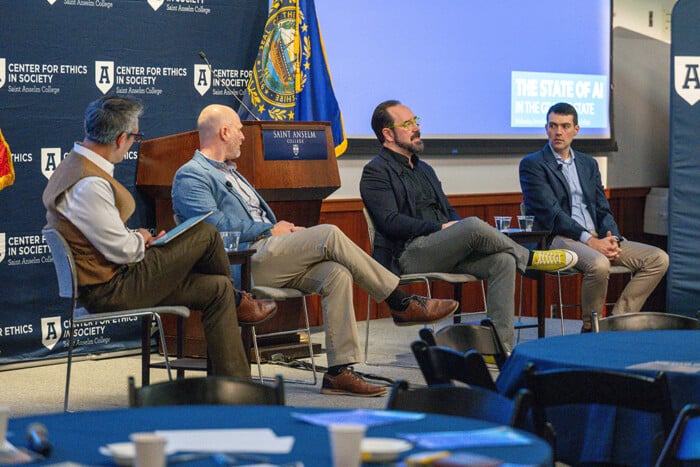
Forum at Saint Anselm's Center for Ethics in Society explores the impact of AI and its potential to boost profit margins
Practical tips to help you avoid the most common AI usage mistakes cybersecurity professionals see today
Cybersecurity isn’t just a defensive measure; it’s a strategic asset that can significantly enhance enterprise value

Significant cyber events exposed the failure of fragmented security tools and established that point solutions can no longer protect against modern threats

The Cybersecurity Maturity Model Certification (CMMC) isn’t some distant regulatory cloud looming; it’s here, it’s already appearing in contract language

A phishing scam, ransomware attack or data breach can turn an ordinary Tuesday into a flat-out disaster if businesses avoid basic, consistent cyber care

For businesses in the United States, AI governance will soon become a compliance imperative, not just a best practice
The ever-evolving digital world we operate in each day offers infinite opportunities for business growth and development, but it also presents many risks.
Overwatch Foundation is helping the state and school districts protect critical systems